
How to organize a car shortlist from several websites
Keep your candidates, reasons and unanswered questions together so you can make progress between browsing sessions.
The worked examples are fictional. Use the worksheets with your own listings and quotations; example amounts are not market prices.
On this page
Give Each Collection One Buying Decision
When organizing your car shortlist, it’s essential to create collections that focus on a single buying decision. This approach helps maintain a coherent brief and ensures that your candidate batch remains manageable. Aim for a suggestion of 3-5 cars per collection, which allows for a focused comparison without becoming overwhelming. This is not a scientific process but a practical one, designed to streamline your decision-making.
Start by distinguishing between broad research bookmarks and cars that are worthy of seller contact. Broad research bookmarks are vehicles that catch your interest but may not yet meet all your criteria. These are useful for understanding the market and refining your preferences. Cars worthy of seller contact, on the other hand, should closely align with your needs and be serious contenders for purchase. By separating these categories, you can prioritize your efforts and avoid wasting time on less relevant options.
Intake Rule
When adding a car to your shortlist, follow a structured intake rule. This ensures that each candidate is evaluated consistently and that you have all the necessary information to make an informed decision. Record the following details for each car:
-
Exact Link/Source: Note the URL or platform where the car is listed, such as mobile.de, autoscout24.com, or otomoto.pl. This will help you quickly revisit the listing for updates or further details.
-
Date: Record the date you added the car to your shortlist. This helps track how long a vehicle has been under consideration and can indicate if a decision is overdue.
-
Identity: Include the make, model, year, and any unique identifiers like VIN or listing ID. This ensures you can easily differentiate between similar listings.
-
Why It Fits: Clearly state why this car is a good fit for your needs. This could be based on factors like price, mileage, features, or location.
-
Essential Unknowns: Identify any critical information that is missing from the listing, such as service history, accident reports, or warranty details. Knowing what you don’t know is crucial for making an informed decision.
-
Next Action: Determine the next step for each car, whether it’s contacting the seller, scheduling a test drive, or gathering more information. This keeps the process moving forward and prevents endless browsing.
Remember, the source ad remains the source of the current offer, so always refer back to it for the most up-to-date information.
Use Manual Note Stages
To effectively manage your car shortlist, use manual note stages to categorize each candidate. This method helps you keep track of where each car stands in your decision-making process. The stages include:
-
To Consider: Cars that have potential but require further evaluation. These might need additional information or a comparison with other options.
-
To Contact: Vehicles that meet your criteria and are ready for seller contact. At this stage, you should have a list of questions prepared to fill in any essential unknowns.
-
To View: Cars that have passed the initial screening and are worth seeing in person. Arrange test drives and inspections to verify the car’s condition and suitability.
-
Finalist: Vehicles that have been viewed and meet all your requirements. These are your top contenders for purchase, and you should be ready to negotiate terms.
-
Rejected: Cars that no longer meet your criteria or have been outperformed by other candidates. Clearly document the reasons for rejection to avoid reconsidering them later.
By explicitly using these stages, you avoid relying on built-in status boards or automatic tracking systems, which may not align with your specific needs. A candidate without a next question should not absorb endless browsing time. If you find yourself stuck on a particular car, it’s a sign to either move it to the rejected stage or determine a clear next action. This disciplined approach ensures that your car-buying process remains efficient and focused.
Fictional Eight-Link Cleanup
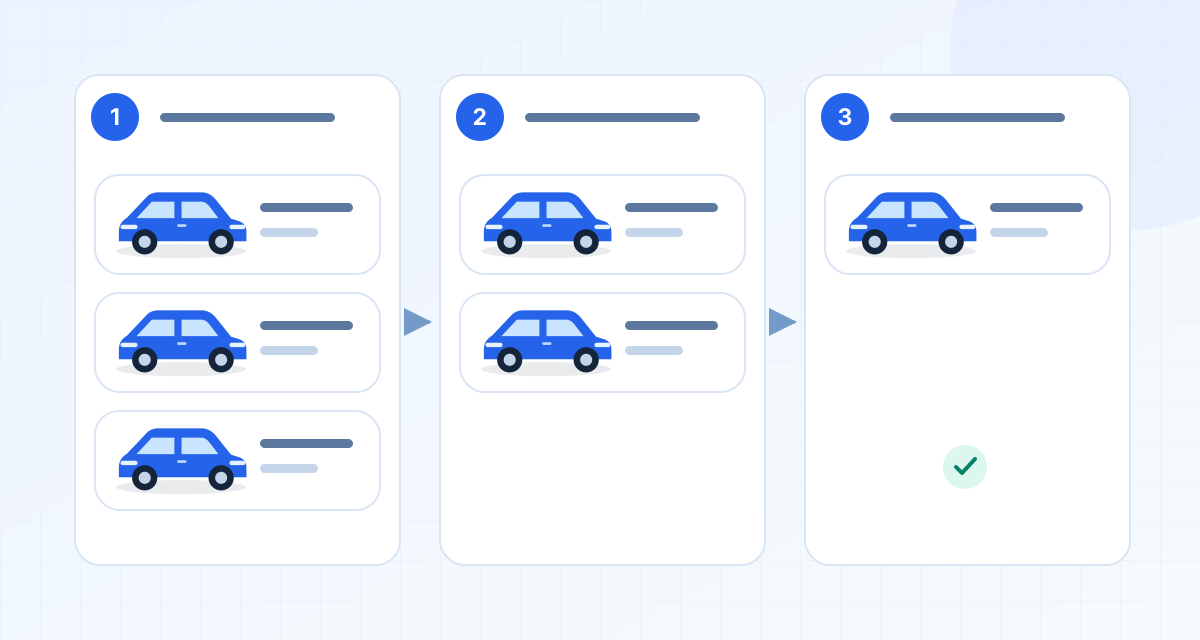
When organizing your car shortlist, it’s crucial to streamline the list by identifying duplicates and removing non-viable options. In this scenario, you start with eight links labeled A through H. After a thorough review, you determine that links D and G are duplicates of A and C, respectively. This leaves you with six unique cars: A, B, C, E, F, and H. Further analysis reveals that B has a manual gearbox and fails the buyer’s automatic-transmission requirement, E is outside your travel area, and H’s seller confirms the car is unavailable. Consequently, you have three viable cars to check: A, C, and F. Below is a compact table summarizing the status and next actions for each candidate.
| Candidate | Reason | Status | Next Action |
|---|---|---|---|
| A | Unique car | Viable to check | Schedule viewing |
| B | Manual gearbox; automatic required | Not viable | Remove from list |
| C | Unique car | Viable to check | Schedule viewing |
| E | Outside travel area | Not viable | Remove from list |
| F | Unique car | Viable to check | Schedule viewing |
| H | Seller confirms unavailable | Not viable | Remove from list |
Actions to Take
-
Schedule Viewing for Viable Cars: For cars A, C, and F, contact the sellers to arrange a viewing. This will allow you to verify the condition of the cars in person and ask any additional questions you might have.
-
Remove Non-Viable Cars: For cars B, E, and H, remove them from your shortlist to avoid clutter and focus your efforts on the viable options.
Duplicate Checks
When dealing with potential duplicates, it’s important to confirm whether two listings refer to the same car. This can be done by comparing the source reference, seller information, mileage, and photos. If you suspect a duplicate, ask the seller for clarification on the car’s identity. Remember, similarity is not proof of duplication, so save both URLs for any confirmed duplicates to maintain a complete history.
Steps for Duplicate Checks
-
Compare Source Reference: Check if the reference numbers or IDs provided in the listings match. This is often a clear indicator of duplication.
-
Check Seller Information: Compare the seller details as one clue, not proof of identity. Different contact details do not establish that the vehicles are distinct; ask which exact vehicle each advertisement concerns.
-
Check Mileage and Photos: Look for identical mileage figures and photos. If these match, it’s likely the same car.
-
Ask for Clarification: If you’re uncertain, contact the seller to confirm whether the listings are for the same vehicle.
-
Save URLs: For confirmed duplicates, save both URLs. This will help you track any changes or updates to the listings.
Maintain Original Offer Wording and Timestamp
Keeping a record of the original offer wording and timestamp is essential for tracking any changes in the listing. If the price is revised, note the old and new prices along with the date of change. A missing ad is not proof that the car is sold, so maintain a record of all interactions and updates.
Steps to Maintain Records
-
Record Original Offer: Save the original wording of the offer, including any specific terms or conditions mentioned.
-
Note Timestamp: Record when you first accessed the listing. This tells you how old your notes are, not how long the car has been on the market before you found it.
-
Track Price Changes: If the price changes, note both the old and new prices along with the date of change. This information can be useful in negotiations.
-
Monitor Listing Availability: If a listing disappears, it doesn’t necessarily mean the car is sold. Keep a record of the URL and any communication with the seller.
Copyable Per-Car Note
When organizing your car shortlist, it’s crucial to maintain detailed notes for each vehicle under consideration. This will help you keep track of essential information and make informed decisions. Below is a template for a copyable per-car note, which you can customize for each vehicle:
- Date: [Enter the date you found the car]
- Source: [Enter the source, e.g., Mobile.de, Autoscout24.com]
- Reference: [Enter the reference number or URL of the listing]
- Why It Fits: [Briefly describe why this car meets your needs, e.g., fuel efficiency, size, features]
- Essential Status: [List essential features or criteria that this car meets, e.g., automatic transmission, under 50,000 km]
- Evidence:
- New Stock Case: Confirm actual specification availability, e.g., “Confirmed with dealer: includes navigation system and leather seats.”
- Used Case: Note condition and service evidence, e.g., “Service history available, no major accidents reported.”
- Unknown: [List any unknowns that need clarification, e.g., warranty details, exact mileage]
- Seller Answer: [Record any answers from the seller about your queries, e.g., “Seller confirmed recent service but no warranty.”]
- Next Action: [Specify your next steps, e.g., “Schedule test drive,” “Request more photos of interior”]
- Decision: [Record your decision or status, e.g., “Pending test drive,” “Removed due to high mileage”]
By maintaining such detailed notes, you can easily compare vehicles and make decisions based on comprehensive information.
Weekly or Personal Review Rhythm
Choosing a review rhythm that suits your schedule and decision-making style is essential for staying organized and making timely decisions. Here are some strategies to consider:
-
Reread Latest Ad Before Contact: Before reaching out to a seller, revisit the latest advertisement to ensure that the vehicle still meets your criteria and that no new information has emerged that might affect your decision. This step helps avoid unnecessary communication if the car no longer fits your needs.
-
Close Answered Questions: Once you have received satisfactory answers to your questions from the seller, update your notes and mark those queries as resolved. This will help you focus on unresolved issues and streamline your decision-making process.
-
Remove Confirmed Failures: If a vehicle no longer meets your criteria or has been confirmed as unsuitable (e.g., due to a failed inspection or undisclosed damage), remove it from your shortlist. This keeps your list manageable and focused on viable options.
-
Pause Pending Rather Than Rank Unknowns: When you encounter vehicles with unresolved questions or unknowns, pause your decision-making on those cars rather than ranking them. This approach prevents premature decisions based on incomplete information and allows you to revisit these options once more information is available.
By establishing a consistent review rhythm, you can efficiently manage your shortlist and make informed decisions without feeling overwhelmed.
Separate Collections for Different Buying Decisions
When purchasing vehicles for different purposes, such as a household car versus a work van, it’s important to maintain separate collections. This ensures that you can focus on the specific criteria and requirements for each type of vehicle without losing cross-source comparability.
-
Household Car Collection: Create a dedicated collection for vehicles intended for personal or family use. Focus on criteria such as comfort, safety features, fuel efficiency, and passenger capacity. This collection should reflect the needs and preferences of your household.
-
Work Van Collection: For work-related vehicles, maintain a separate collection that emphasizes practicality, cargo space, durability, and any specific features required for your business. This allows you to evaluate options based on the unique demands of your work environment.
-
Cross-Source Comparability: By organizing your shortlist into separate collections based on the vehicle’s intended use, you can compare options across different sources without losing sight of the specific requirements for each category. This approach helps ensure that you make the best decision for each vehicle type.
Maintaining separate collections for different buying decisions allows you to focus on the unique needs of each vehicle type, ensuring that you make informed and suitable choices for both personal and work-related purposes.
Bring Supported Links into Garageview
The Garageview web app supports imports from mobile.de, AutoScout24 and Otomoto. Use it to bring candidates from those sources into the same collection. The Chrome extension’s direct-save controls support mobile.de. For the other two sources, use the web import workflow. Keep the original source link with your candidate so you can return to the advertisement when a question arises.
If an import fails, first check the link in the source website. Confirm that it points to the intended listing or search and that you can still open it normally. An accessible advertisement is not confirmation that the vehicle remains available; that still needs a seller check. Copy the full current URL and retry through the ordinary import workflow. If it remains unavailable to the importer, preserve your research notes and source link separately so you can continue the buying decision while resolving the import problem.
Imported fields can be missing or ambiguous. Do not replace a blank with an assumption to make the comparison look complete. Record the original wording and the question it raises. For example, “camera not specified—ask seller” is more useful than marking the equipment absent because the import has no value for it.
Share a Decision, Not Just a Folder of Links
Use collection sharing to let the intended people see the candidates. Check the access information shown in the sharing interface before distributing the collection. Agree who will gather seller answers and where the group will record its conclusions. A shared collection works best when readers can tell which statements come from the ad, which come from a seller and which are someone’s preference.
For each review, ask participants to focus on one unresolved point. One person may check whether a candidate meets the agreed timing requirement; another may prepare the luggage test. Record a date with an answer so a later reader does not mistake an old response for a current offer. Avoid copying identity documents or unnecessary private contact details into shared research notes.
Shortlist Questions Answered
How many cars should I keep active?
Start with a small batch you can meaningfully review—three to five is a suggested working limit, not a product limit or research finding. If every candidate still has unanswered essential questions, adding another dozen usually creates more work than progress. Resolve the questions, then widen the search if the batch fails.
What if an advertisement disappears?
Keep the source reference and your last checked date. Mark availability unknown and contact the seller if the candidate still matters. A missing page does not tell you whether the car sold, the ad moved or the seller changed the offer. Do not present the stored price as a current quotation.
Can I rely on automatic duplicate removal?
Use the manual identity checks described above. This workflow does not assume Garageview identifies every duplicate. Preserve both source URLs when two ads are confirmed to describe the same vehicle, while counting the vehicle once in your decision.
Will this workflow notify me about price changes?
It relies on your own source checks, not automatic price alerts. Before contacting a seller or comparing finalists, reopen the relevant advertisements and update the price, conditions and date in your notes. Keep the previous figure only if it helps explain a change.
Your Next Action
Clean up one existing collection using the fictional eight-link example as a method: identify the distinct vehicles, remove confirmed failures from the active shortlist, and give every remaining candidate one next action. Then use the guides on reading car listings and choosing a car together to resolve the questions that remain.
Published by Garageview.ai, with AI-assisted drafting and translation. These guides explain our suggested buying workflow; they are not vehicle inspections or independent marketplace rankings.